- Three new reports added to Cintra People Payroll's reporting suite
- Faster payroll selection for multi‑payroll reporting for Cintra People Payroll
- New payrolled benefits tile in Cintra People Payroll
- Redesigned reports dashboard for Cintra People Payroll
- Revamped Employee Management in Cintra People
- Auto-Enrolment Letters now landing in Employee Hub
- Multi-Payroll Reporting now available in Cintra People Payroll
- Two Payment Authorisation emails added to Cintra Cloud
- New Multi-Period Payroll Reports in Cintra Cloud
- Interactive Payroll Summary Dashboard in Cintra Cloud
November 2025
Three new reports added to Cintra People Payroll's reporting suite
We’ve expanded the reporting options in Cintra People Payroll to give you clearer visibility of statutory payments and greater flexibility when analysing payroll data.
This update introduces brand‑new Statutory Parental Payments, Salary and Allowances, and One-off Payments and Deductions reports in both the Reports section and under each payroll's advanced view.
What’s New?
- View statutory parental payments easily: A new Statutory Parental Payments report brings all parental payment information together in one place, giving you faster reconciliation and a complete overview.
- See the full picture: View payment amounts, weeks due, recoverables, compensation, and payment periods at a glance.
- Two more reports added: Salary and Allowances, and One‑off Payments and Deductions are now available directly from the Reports section as well as the payroll’s Advanced View.
- Customise and save reports: You can customise these reports and save your versions for future use.
- Enjoy a familiar layout: All existing fields, filters, and options remain exactly where you expect them.
What are the key benefits?
- One place to review all statutory parental payments for simpler reconciliation.
- More reporting flexibility with additional report access points.
- Faster workflows thanks to customisable and savable report versions.
- Improved discoverability with consistency across Reports and Advanced View.
What next?
- Go to the Reporting area in Cintra People Payroll.
- You can access the Statutory Parental Payments report now by navigating to Reports and clicking the Payments and Deductions tile.
- The Salary & Allowances and One‑off Payments and Deductions reports are also available in the Reports section, or by opening any payroll and clicking the appropriate tile.
If you need help, we've recently rewritten Cintra People Payroll Reporting help.
Faster payroll selection for multi‑payroll reporting for Cintra People Payroll
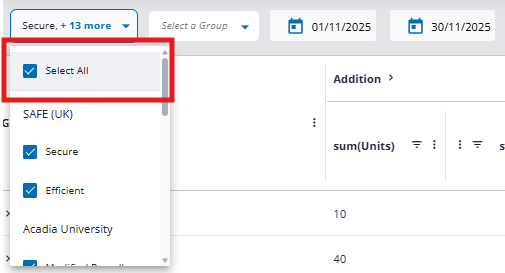
We’ve improved the payroll selection process in Reporting to make choosing the right payrolls quicker and more efficient.
This update streamlines reporting for users managing multiple payrolls.
(click to expand)
What’s New?
- Select payrolls faster: A new Deselect All option has been added to the payroll multi‑select drop‑down, giving you a quick way to clear all selections.
- Reduce unnecessary clicks: Instead of manually deselecting each payroll, you can now clear the list with one click and choose only the payrolls you want.
- Start from a clean slate: The Select All checkbox now lets you instantly reset the selection, making it easy to isolate one or two payrolls.
What are the key benefits?
- Saves time when reporting across multiple payrolls.
- Fewer clicks, especially for organisations with many payrolls.
- More efficient workflow when focusing on specific payrolls.
What next?
Go to the Reporting area and use the updated payroll multi‑select to experience faster, cleaner selections. If you need help, we've recently rewritten Cintra People Payroll Reporting help.
New payrolled benefits tile in Cintra People Payroll
We’ve enhanced the Payroll Summary Dashboard with a new tile that gives you instant visibility of payrolled benefits.
This update helps you spot trends quickly and access key payroll information more efficiently.
What’s New?
- See benefits instantly: A new Payrolled Benefits tile displays payrolled benefits information directly on your dashboard, removing the need to open separate reports.
- Get a quick overview: View payrolled benefits for the current period at a glance, helping you stay informed and identify changes quickly.
- Drill into the detail: A detail link lets you navigate straight to supporting payroll summary data for deeper insight.
- View more key data in one place: This new tile brings another important payroll metric into your central dashboard.
What are the key benefits?
- Faster access to payrolled benefits information.
- Clearer visibility of trends for the current period.
- Less navigation between reports and screens.
What next?
Go to the Payroll Summary Dashboard in Cintra People Payroll to see the new Payrolled Benefits tile. If you need help, we've recently rewritten Cintra People Payroll Reporting help.
Redesigned reports dashboard for Cintra People Payroll
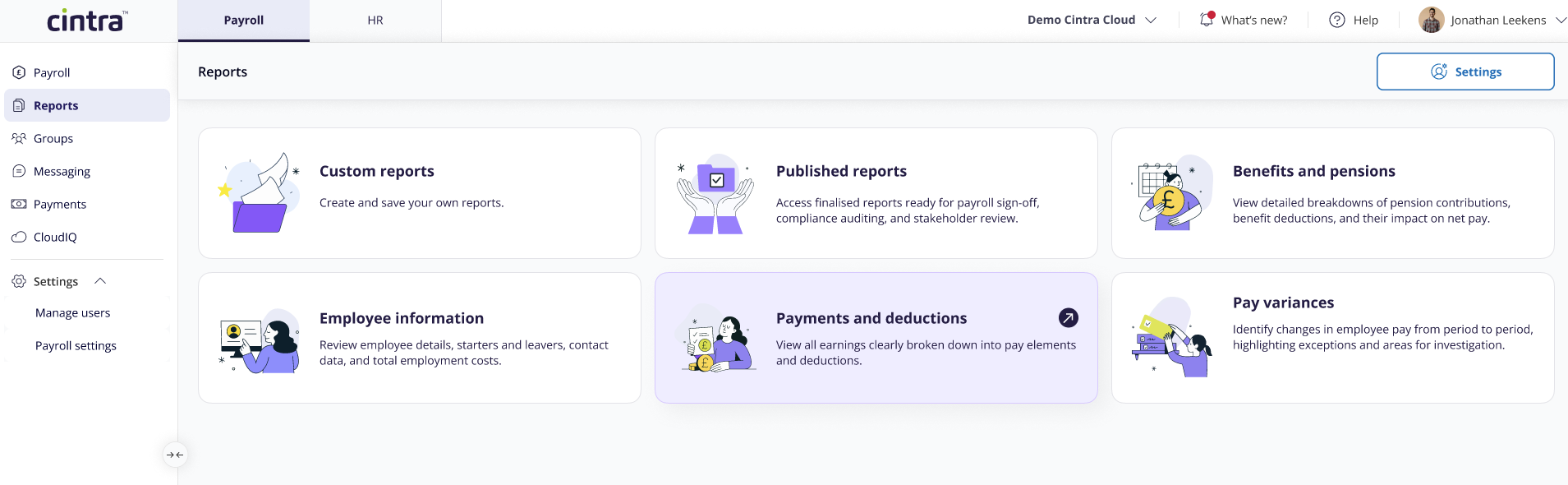
We’ve refreshed the Reports area to make it faster and easier to find exactly what you need.
The new dashboard introduces clearer navigation, smarter filtering, and improved visibility of report details.
What’s New?
- Find reports faster: A redesigned dashboard now groups reports into six clear tiles: Custom reports, Published reports, Employee information, Payments and deductions, Benefits and pensions, and Pay variances.
- Reduce scrolling: One‑click filtering instantly narrows the report list to the category you’ve selected.
- See details instantly: Report descriptions now appear directly in the grid, removing the need to hover over information icons.
- Scan more easily: A cleaner, simplified layout helps you identify the right report in seconds.
What are the key benefits?
- Faster navigation through reports.
- Fewer clicks and less scrolling.
- Better visibility of the content and purpose of each report.
What next?
Visit the updated Reports page to explore the new dashboard layout. If you need help, we've recently rewritten Cintra People Payroll Reporting help.
October 2025
Multi-payroll reporting launched in Cintra People
We've enhanced Cintra People reporting so you can now analyse data across multiple payrolls simultaneously. This eliminates the need to generate multiple individual reports and manually consolidate data when comparing different payrolls.
What's new?
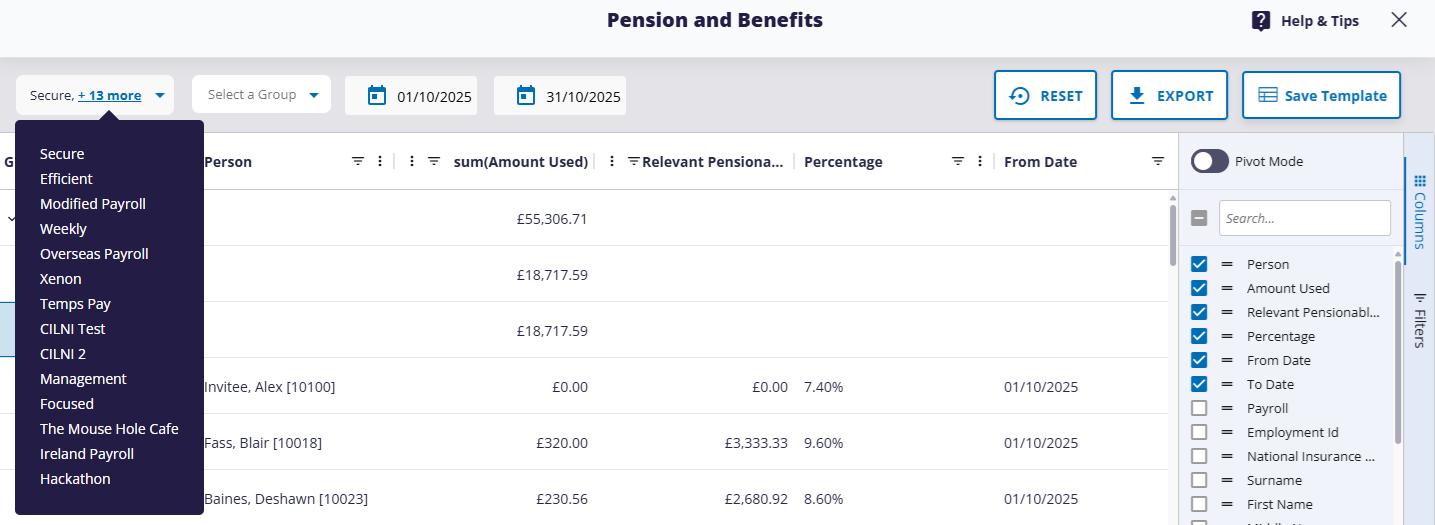
- Multi-payroll selection: Select multiple payrolls when creating or running a report—the interface automatically adapts based on whether your report supports single or multiple payroll selection.
- Excel exports: Export data from multiple payrolls into a single Excel file for both multi-payroll/single-period and multi-payroll/multi-period combinations.
- Enhanced reporting interface: Switch between published reports and "live" report, and filter report templates by report category (e.g. "Payments and Deductions"
(click to expand)
What are the key benefits?
Multi-payroll reporting saves you time and gives you better insights across your organisation:
- Save time: Generate one report instead of running multiple individual reports and manually combining the data.
- Better business intelligence: Spot trends, patterns, and variances across different payrolls or departments without manual data manipulation.
- Flexible analysis: Combine multi-payroll with multi-period reporting to compare performance across different payrolls and time periods simultaneously.
- Seamless experience: Almost all your existing reports work the same for both single and multiple payrolls, and they all maintain the same security and permission controls you're used to.
What next?
In the side menu, click Reports, then open a report and select payroll(s) from the drop-down list.
To find out more, please visit our new help articles!
September 2025
Revamped Employee Management in Cintra People
We’ve improved how you add and edit employees, making the experience smoother and more intuitive.
What's New?
- New Starter wizard: Saves time with a clearer, easier-to-follow flow.
- Edit Employee flow: Reduces friction thanks to a cleaner, more consistent experience.
- Layout improvements: Improves visibility and gives you more space to work with employee records.
What are the key benefits?
These changes make it quicker and easier to manage employee data,
What next
These changes are already live. To find out more, go to the following help pages:
Auto-Enrolment Letters now landing in Employee Hub
Auto-enrolment (AE) letters generated in Cintra IQ can now be securely published to each employee’s personal Employee Hub account.
What's new?
- Direct access: Employees can view their auto-enrolment letters in the Documents section of their Employee Hub.
- Secure publishing: Letters are delivered to the correct employee’s account with no manual handling.
- Automated alerts: Employees receive email notifications when a new letter is available.
- Permanent access: Letters remain available for future reference and audit purposes.
What are the key benefits?
- Ensures compliance with UK pension legislation.
- Reduces admin by eliminating manual distribution of AE letters.
- Improves transparency by giving employees direct access to pension communications.
- Supports audit readiness with secure, traceable delivery.
What next?
- To find out how to access your AE letter, see Employee Hub for Employees.
- For more information on AE letters, see how do I create and publish letters.
August 2025
Two Payment Authorisation emails added to Cintra Cloud
We’ve added a couple of new emails in Cintra Cloud to keep payment authorisers informed about upcoming authorisations and auto-authorisations.
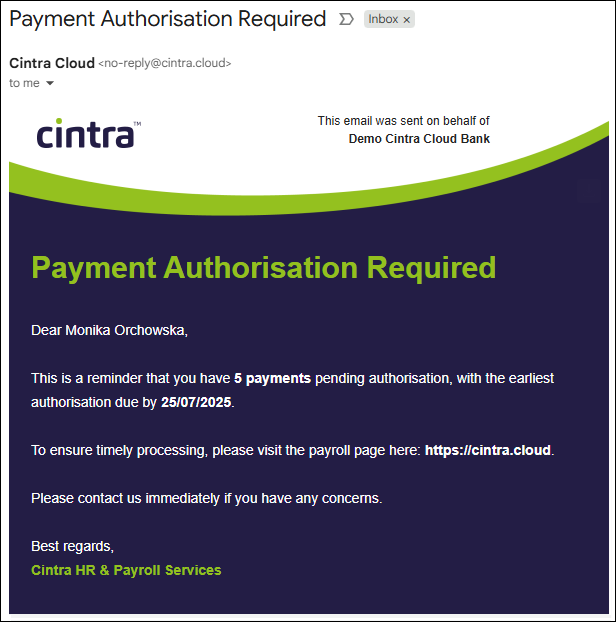
Payment authorisation reminder email:
Sent on or before the BACS day, Cintra Cloud will send all relevant payment authorisers an email to inform them that upcoming salary or liability payments need to be authorised. A further reminder email will be sent if the authorisation is still not completed.
Liability payment auto-authorised notification email:
If your account has been set-up to auto-authorise payments to HMRC or other third parties, Cintra Cloud will send you an email to inform you of all the payment runs made within the tax period or accounting period.
(click to expand)
What are the key benefits?
These emails help ensure:
- Timely authorisation of payments
- Clear visibility of auto-authorised transactions
- Reduced risk of missed deadlines or overlooked payments
What next?
If you're expecting but haven't received these emails, make sure they haven't ended up in your spam/junk folders, and add no-reply@cintra.cloud to your list of trusted senders!
July 2025
Centralised Payment Authorisation in Cintra Cloud
We’re pleased to announce a new centralised Payment Authorisations section in Cintra Cloud. This update introduces a unified interface for authorising all payroll payments, with improved visibility, audit tracking, and role-based access controls. This is available to both SaaS AND Source customers.
What's new?
Single Authorisation Hub:
- Access all pending and completed payment authorisations in one place via the Payments menu.
Enhanced Dashboard Experience:
- Dashboard alerts when payments require approval.
- Visual authorisation deadline indicators.
- One-click access via “Review Payment(s)” or Payments menu.
Comprehensive Payment View;
- View payments across all payrolls and types (Salary, HMRC, Third Party etc).
- Quick glance at payment amounts, employee counts, and pay dates.
- Authorise payments for each payment run individually.
Audit and History:
- Full history tab for previously authorised payments.
- Track who authorised each payment and when.
- Clear status indicators for each payment.
Smart Role-Based Access;
- Tailored permissions based on user roles.
- Secure controls to prevent unauthorised access.
SaaS vs Source Customers
SaaS Customers (using Cintra iQ):
- Continue processing payroll in Cintra iQ.
- Use the new centralised section to authorise payments.
- Benefit from improved visibility across payroll types.
Source Customers (using Cintra Cloud for payroll and authorisation):
- Continue using existing workflows.
- Access the new section for enhanced visibility and audit capabilities.
What are the key benefits?
The new Payment Authorisations section streamlines your workflow and improves visibility across payrolls with:
- A centralised hub for all authorisations
- Clear audit trails and status tracking
- Automated email notifications for pending and completed payments
- Role-based access to ensure secure approvals
What next?
To find out more, read our How To articles: How do SaaS customers authorise payments on Cintra Cloud and How do I authorise payments for my payroll (Source Customers Only), or watch this short video:
Customise Report Templates in Cintra Cloud
Cintra is proud to introduce a powerful template management functionality for Cintra Cloud Live Reports. You can now save, edit, and delete custom report templates to personalise your payroll reporting experience.
What's new?
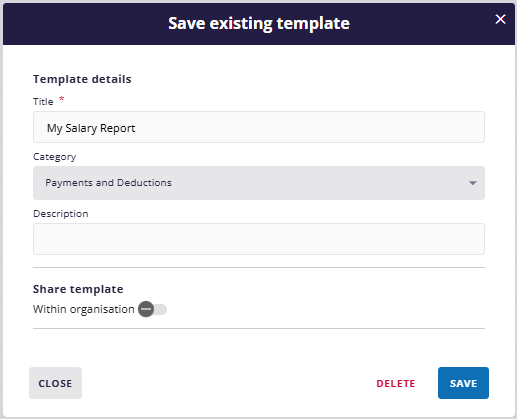
(click to expand)
- Complete customisation: Add or remove columns, apply filters, sort, group, and pivot data to create tailored views.
- Reusable templates: Save customised reports as templates for instant reuse.
- Quick edit: Modify template names, descriptions, and categories easily.
- Delete templates safely: Remove outdated or unused templates with prompts to prevent accidental deletion.
- Flexible saving options - Update existing templates or create new versions from modified reports.
What are the key benefits?
This feature is ideal for teams who need consistent, tailored reporting views, including:
- Quick access to saved templates directly from the report menu.
- Reduced time spent recreating custom reports.
- Support for department-specific views and recurring monthly reports.
What next?
Why not try customising on of your live reports? For more information, see Save, Edit and Delete Report Templates in Cintra Cloud.
New Multi-Period Payroll Reports in Cintra Cloud
We’re pleased to introduce two more invaluable multi-period reports in Cintra Cloud Live Reporting:
- Gross to Net (Detailed)
- Gross to Net (Summary)
These new reports transform how you analyse payroll data across multiple periods, offering both high-level overviews and detailed trend insights.
Gross to Net (Detailed) Report
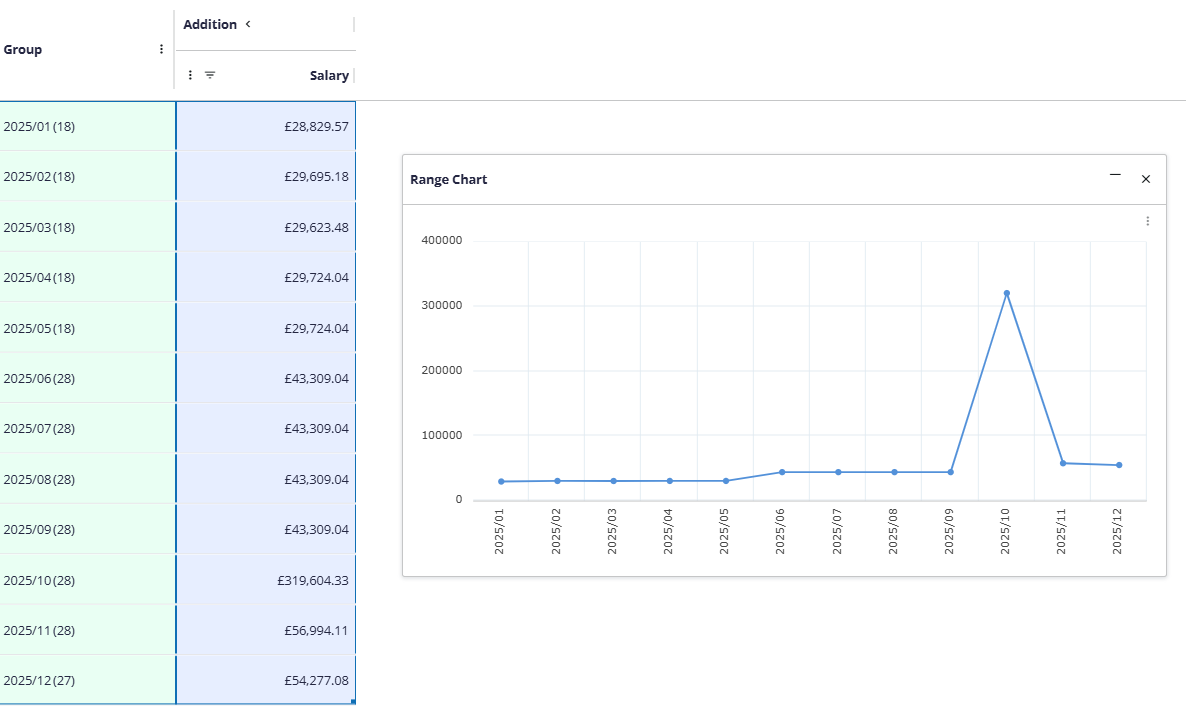
(click to expand)
- Trend-focused layout: Pay headings as columns and periods as rows make it easy to track changes over time.
- Chart creation ready: Ideal structure for generating line, bar, and stacked charts.
- Seasonal pattern identification: Spot spikes, dips, and recurring trends with ease.
- Visual chart export: Download charts as PNG images directly from the report interface.
- Operational insights: Identify staffing needs, efficiency gains, and policy impacts.
- Financial forecasting: Use historical data to predict future payroll costs.
Gross to Net (Summary) Report
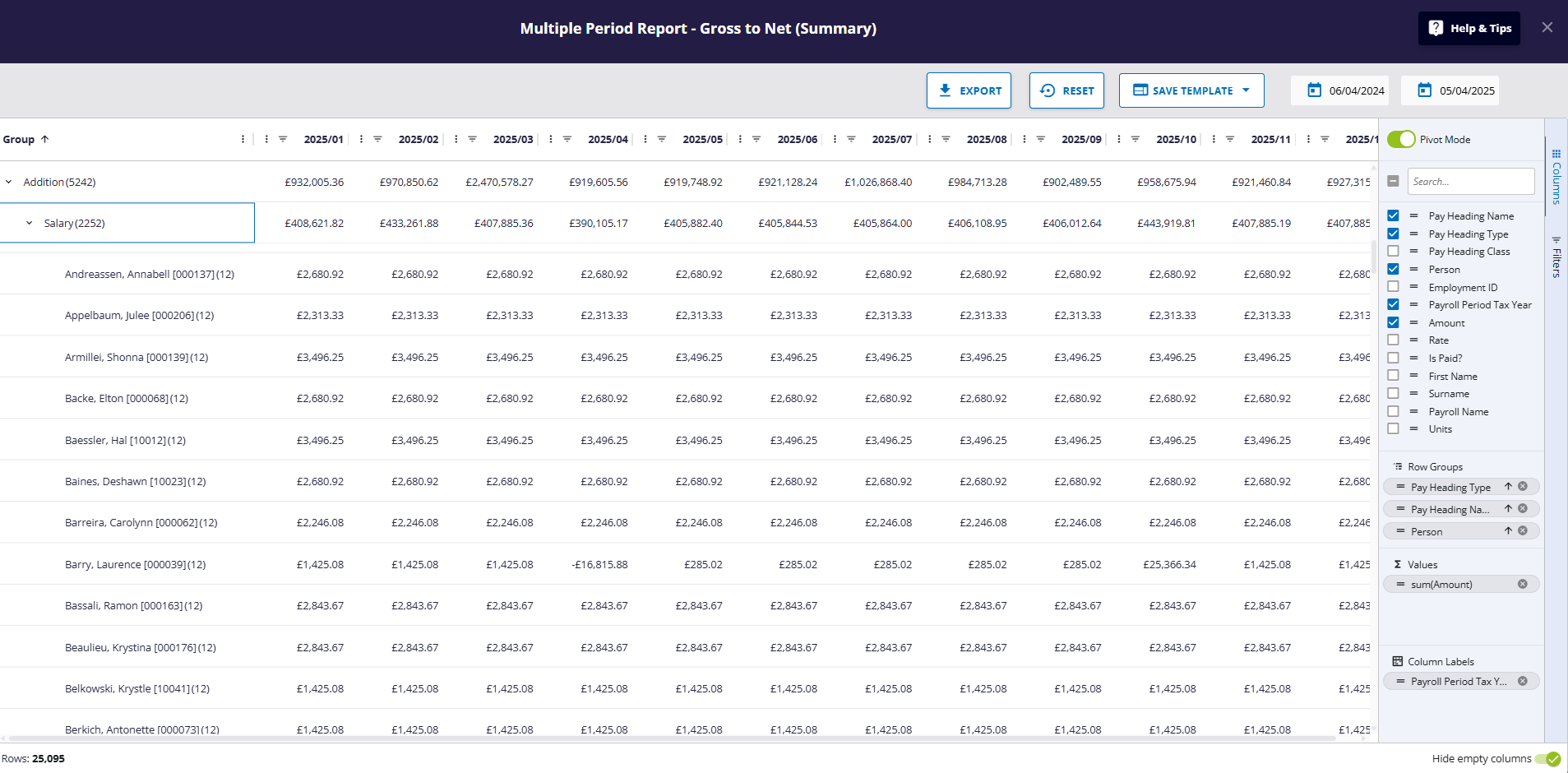
(click to expand)
- Complete payroll overview: View additions, deductions, employer overhead, and net pay across multiple periods at a glance.
- Three levels of detail: Drill down from summary totals to specific pay headings and individual employees.
- Flexible date ranges: Analyse monthly trends, quarterly patterns, or full annual reviews.
- Units view available: View hours worked alongside monetary amounts.
- Compliance ready: Built-in employer overhead tracking supports tax reporting requirements.
- Massive time saver: Replace hours of manual work with instant, structured insights.
What are the key benefits?
These reports offer tailored views for different roles:
- Finance teams can track budget variances and forecast costs.
- HR professionals can monitor policy impacts and seasonal trends.
- Payroll administrators can verify accuracy and streamline reporting.
Whether you're reviewing compensation trends or building visual dashboards, these reports make multi-period analysis fast, flexible, and insightful.
What next?
The reports are ready for you to try out. To find out more, see Multiple Period Report - Your Guide to Charting Payroll Trends and Multiple Period Report - Gross to Net (Summary): A Simple Guide for Payroll Data Analysis.
Interactive Payroll Summary Dashboard in Cintra Cloud
We’re delighted to announce Cintra Cloud's Interactive Payroll Summary Dashboard — a new feature designed to give payroll teams and managers real-time visibility into payroll data. This dashboard replaces static reports with a dynamic, easy-to-navigate interface that supports faster decision-making and more efficient payroll verification.
What's new?
- Live payroll data: View up-to-date payroll information as it’s processed, helping you make timely and informed decisions.
- Flexible filtering: Filter by department, pay period, and employee to focus on the data that matters most.
- Drill-down capability: Start with a high-level summary and click through to view individual employee details.
- Role-specific views: Tailored insights for Payroll Administrators and Group Managers, supporting their specific workflows.
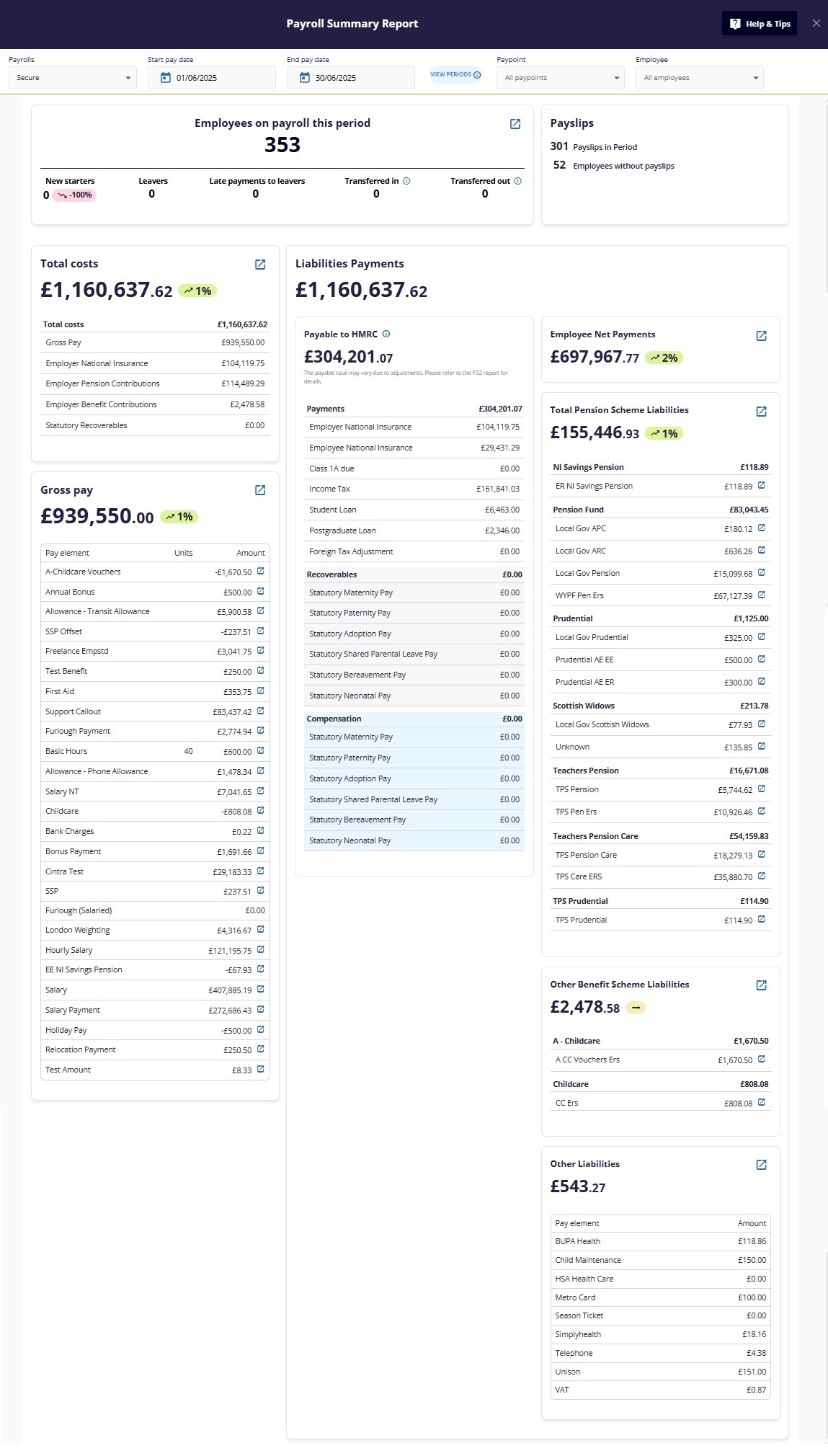
(Click to expand)
What are the key benefits?
This dashboard supports a range of payroll tasks across roles:
- Payroll Administrators can detect issues early, verify inputs efficiently, and compare current and previous periods.
- Group Managers can review team payroll data, confirm accuracy, and manage exceptions with ease.
What next?
Try it out yourself! Within the Payroll tab in Cintra Cloud, click the Payroll Summary button. For more information, see the articles in this folder: Payroll Summary Dashboard.
April 2025
New Loan and Attachment of Earnings Reports in Cintra Cloud
Cintra is pleased to announce the launch of two powerful new period reports in Cintra Cloud Live Reporting:
- Loan Report
- Attachment of Earnings (AOE) Report
These reports provide clearer visibility into employee deductions and repayment schedules, helping payroll teams stay compliant and informed.
Loan Report
- Track employee loans and repayments: View outstanding balances, repayment history, and salary deductions in one place.
- Support for financial compliance: Ensure deductions are accurate and timely, with clear audit trails.
- Transparency for employees: Easily verify loan status and repayment progress.
Attachment of Earnings (AOE) Report
- Detailed AOE breakdown: Access employee details, AOE references, deduction amounts, payment dates, and outstanding balances.
- Legal compliance support: Designed to help manage deductions related to County Court Judgments (CCJs) and other legal orders.
- Centralised view: All relevant AEO data available in one report for faster review and processing.
What are the key benefits?
These reports help payroll teams and managers:
- Monitor and manage employee deductions with confidence
- Maintain compliance with financial and legal obligations
- Reduce manual tracking and improve reporting accuracy
What next?
Both reports are waiting for you to try in Cintra Cloud. For more information, see How to run the Loans Report and How to run the Attachment of Earning (AOE) Report.
March 2025
Passkeys launched in Cintra Cloud and Mobile Apps!
We’ve introduced Passkey login support across Cintra Cloud, Employee Hub, and our iOS and Android apps. Passkeys offer a simpler, more secure way to log in — replacing traditional passwords with device-based authentication like fingerprint, face scan, or PIN.
What's new?
- Cross-platform support: Use passkeys to log in on web and mobile, with no need to remember or reset passwords.
- Device-based authentication: Log in using your fingerprint, face scan, or device PIN — no typing or phones required.
- Phishing protection: Passkeys only work with the real Cintra Cloud site or app, helping prevent login attempts on fake sites.
- Security built-in: Passkeys use public-key cryptography, making them resistant to guessing, theft, or reuse.
What are the key benefits?
Passkeys help users:
- Log in faster and more easily
- Avoid password-related issues
- Stay protected against phishing and data breaches
What next?
You will be prompted to set up a passkey the next time you log in. For more information, see the articles in this folder.
January 2025
Impersonation future now launched!
Cintra iQ now supports user impersonation for bureau managers, bureau users, and team leaders. This allows authorised users to view the system exactly as another user would..
What's new?
- Bureau managers/users and team leaders can be granted the Impersonation permission.
- Users with this permission can easily impersonate any user, and quickly end the impersonation when they are finished.
What are the key benefits?
This feature improves support and troubleshooting workflows:
- Enables accurate visibility into another user’s experience.
- Helps resolve user issues faster by replicating their view.
- Reduces back-and-forth by allowing direct access to user-specific data and permissions.
What next?
To find out how to assign the permission and impersonate another user, see Bureau User Management.
Was this article helpful?
That’s Great!
Thank you for your feedback
Sorry! We couldn't be helpful
Thank you for your feedback
Feedback sent
We appreciate your effort and will try to fix the article