- Report Packs are now available in Cintra People Payroll
- Salary sacrifice schemes have landed in Cintra People Payroll!
- Manage your API credentials and integrations directly from Cintra People Payroll
- Export your Payroll Summary Dashboard as a PDF in Cintra People Payroll
- Multi-payroll view added to Cintra People's Payroll Summary Dashboard
- New HMRC reports released in Cintra People: P32 and Apprenticeship Levy reports
- New Occupational Sick Pay Report now available in Cintra People Payroll
- App-based Multi-Factor Authentication now available in Cintra People
- Cintra People Payroll's Pay Variance Report helps you spot pay changes faster
You can also read about all the updates we made to Cintra People in 2025.
To find out more about any changes to Cintra Bureau, see Cintra Bureau release notes.

April 2026
Report Packs are now available in Cintra People Payroll
We've introduced Report Packs in Cintra People Payroll. Report Packs are curated collections of reports that help you organise and access the reports you need quickly and efficiently.
What's new?
- Quick access from Published reports: From within a payroll, quickly access and view report packs from the Published reports tab. You can see all available report packs without leaving your payroll workspace.
- Create and manage your report packs (if you have payroll full access).
- View both 'Payroll' and 'PAYE Scheme' report packs in one place.
- Build report packs by selecting from Cintra People Payroll's standard reports.
- Create collections of your favourite reports, most-used reports, or reports you run every payroll cycle.
- Maintain and update your report packs as your needs evolve.
- Share your report pack with all users in your organisation to save them time creating the same collection
- One-click access: Click a report pack to instantly see all the reports it contains. No more digging through lists of individual reports.
- Export all reports at once: Download a single Excel spreadsheet containing all of your reports as tabs. No need to export reports individually.
- Read-only insight: Protected reports within a pack are read-only so you know they cannot be edited.
What are the key benefits?
Report Packs help you find the reports you need without hassle. By creating and sharing report pack collections, you can:
- Access reports faster: Find your curated collections instead of browsing individually
- Work more efficiently: Build once, share across your organisation to eliminate duplicate effort
- Save time: Export all reports from a pack as a single Excel spreadsheet with tabs
What next?
You can access the new report packs from both the main Reports section (if you have access to it), and in the Published Reports tab of individual payrolls. For more information, see Report packs.

April 2026
Salary sacrifice schemes have landed in Cintra People Payroll!
You can now manage salary sacrifice schemes directly within Cintra People Payroll. Salary sacrifice benefits can be assigned to individual employees from their Benefits profile, with full control over scheme type, sacrifice amount, and date range - without ever having to leave the system.
What's new?
- Assign salary sacrifice schemes to employees From an employee's Benefits tab, payroll administrators can assign pre-configured salary sacrifice schemes in a guided two-step flow. Supported scheme types include Cycle to work, Technology Scheme, and Additional Pension, with the sacrifice amount set as either a fixed £ value or a percentage of salary.
- Override default values per employee: Each scheme carries a default sacrifice amount set at the company level. Where needed, administrators can override this on a per-employee basis - useful for handling exceptions without changing the underlying scheme configuration.
- Set flexible date ranges: Each assignment requires a start date, with an optional end date. End dates can be left blank for open-ended schemes.
- Manage the full benefit lifecycle: Once assigned, schemes can be edited, renewed, ended, or deleted at any time from the Salary sacrifices tab.
What are the key benefits?
- Less manual work: Salary sacrifice deductions are managed directly in Cintra, removing the need for spreadsheets or external tracking tools.
- Fewer errors: Pre-tax deductions are applied consistently each payroll period based on the configured amount, reducing the risk of manual entry mistakes.
- Full visibility: Administrators can see all salary sacrifice assignments for an employee in one place, including scheme details, sacrifice amounts, dates, and live status.
- Flexible by design: Support for both fixed and percentage-based sacrifice amounts, with per-employee override capability, means the feature adapts to real-world payroll complexity.
What next?
You can edit any existing employee to set up salary sacrifice benefits. See Employee: Benefits (edit employee only).

March 2026
Manage your API credentials and integrations directly from Cintra People Payroll
Cintra People now includes a Manage Integrations area, giving you full control over how your organisation connects to external systems. You can create API credentials, configure integrations, and set granular permissions, all without needing to contact Cintra Support.
What's new?
- API credential management: Create and manage your own API credentials (Client ID + Client Secret) directly within Cintra People.
- Integration setup: Link credentials to your organisation, assign permissions, and download integration instructions to authenticate and call the API.
- Granular permission control: Assign only the permissions each integration needs, from reading reference data to creating new employee records and uploading documents.
- Secure credential rotation: Replace credentials safely without breaking existing access by creating new credentials and updating your external system before removing the old ones.
This feature requires the new API credentials administrator role which Cintra Support will assign to administrators initially.
What next?
With the new admin role, you can access the new Manage Integrations feature from the side-menu.
See Managing API credentials and integrations for more information, including setting up integrations, rotating credentials, and a reference table of available permissions.

February 2026
Export your Payroll Summary Dashboard as a PDF in Cintra People Payroll
We are pleased to announce a new addition to the Payroll Summary Dashboard in Cintra People Payroll: PDF Export. Payroll managers can now download a professionally formatted PDF of their dashboard for manual sign-off or archiving.
What's new?
- Export to PDF directly from the Payroll Summary Dashboard.
- The exported PDF captures all dashboard tiles and their current values, including Employees, Total Costs, Gross Pay, Liability Payments, and HMRC Payments.
- All applied filters are included in the document, date range, payroll selection, and employee group filters, so the context of the report is always clear.
- The payroll cycle stage banner includes a clear statement of where the payroll was in its processing cycle at the time of export. This removes any ambiguity about whether figures represent draft or final, approved data.
- Generation metadata is included on every export, including the date and time of export, the user who generated it, the payroll name(s), and the period(s) covered.
What are the key benefits?
- The PDF export gives payroll teams a reliable, audit-ready document at the click of a button.
- Supports manual sign-off workflows: Finance directors, payroll managers, and authorised approvers can review a clear, portable document before authorising payroll.
- Meets archiving requirements: Exported PDFs provide a point-in-time record suitable for retaining for HMRC and audit purposes.
- Removes ambiguity with payroll status context: The payroll cycle stage banner makes it immediately clear whether the data was final at the time of export, eliminating the risk of approving a draft report by mistake.
What next?
Go to the Payroll Summary Dashboard, apply any filters you need, and click Export. For more information, see Payroll Summary Dashboard.
Multi-payroll view added to Cintra People's Payroll Summary Dashboard
What’s new?
- Multi‑payroll selection: You can now choose multiple payrolls from the dropdown to see combined totals for costs, gross pay, third‑party liabilities, and net pay.
- Single access point: No more switching between payrolls or generating separate reports. Everything is consolidated within one dashboard.
What are the key benefits?
This update saves time by removing the need to view payrolls individually, giving you a clearer overview of organisation‑wide payroll performance at a glance. It also streamlines reporting by reducing the number of separate reports you need to run.
What next?
This feature is already live, and accessible to all users who have access to multiple payrolls. To access it:
- In the side menu, click Reports.
- Click Payroll Summary.
- At the top-left, select which payroll(s) you want to view in the report.
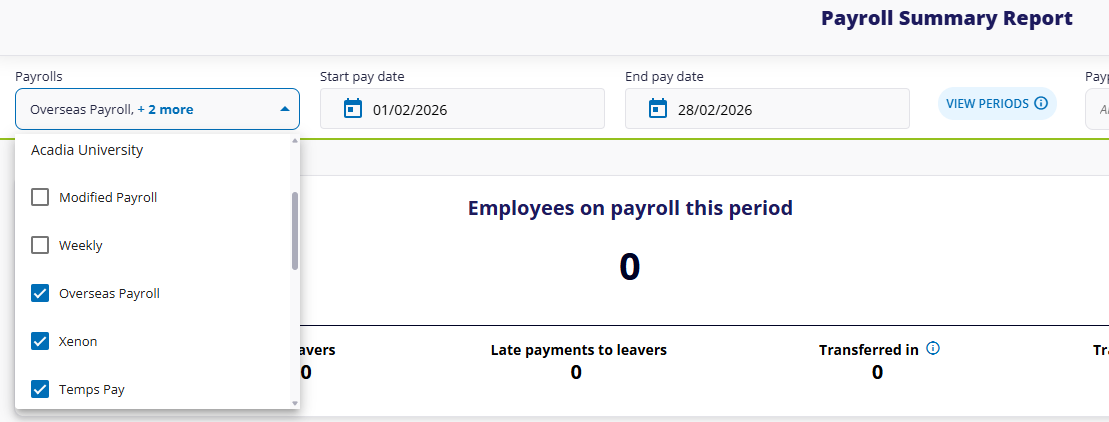
For more information on using the dashboard, see Payroll Summary Dashboard.

January 2026
New HMRC reports released in Cintra People: P32 and Apprenticeship Levy reports
We're excited to announce four major additions to Cintra People Payroll's reporting suite: P32 and Apprenticeship Levy reports. Both these new reports bring critical HMRC compliance into Cintra People's cutting-edge report suite, helping you transition away from legacy systems.
What's new?
Three P32 Employer Payment Reports
Generate P32 reports showing all payments due to HMRC including PAYE tax, National Insurance contributions, student loan deductions, and apprenticeship levy.
View detailed breakdowns of statutory payment recoveries (maternity, paternity, adoption, bereavement, and the new neonatal care pay).
Access hierarchical report structures with expandable sections for payments, deductions, and parental payment compensations.
Select specific PAYE schemes and tax years to generate reports for any historical period.
Apprenticeship Levy Reports
Calculate and track apprenticeship levy obligations at PAYE scheme level
View levy calculations with annual allowance allocations and levy percentages
Access employer details, accounts office references, and tax year information in a dedicated overview panel
Generate reports for different tax years to support year-end reconciliation
What are the key benefits?
- Greater efficiency and self‑service: Generate HMRC compliance reports whenever you need them, without waiting for batch runs or manual extracts.
- Full control over your data: Select PAYE schemes, tax years, and reporting periods flexibly, ensuring you always get the exact dataset you require.
- Confidence in compliance: Both reports include all HMRC‑required data fields, including new statutory payment types like Statutory Neonatal Care Pay, helping you stay fully aligned with UK payroll regulations.
- Modern reporting experience: Built on Cintra People’s Custom Reporting Framework, offering powerful filtering, sorting, exporting, and consistent access to historical data.
What next?
All the new reports are already accessible in you reporting dashboard. In the side menu, click Reports, then HMRC Payment Summary, then open any of the four new reports.
- For more general information on reporting, see Getting started with reporting.
- For a full list of available reports, see Overview of available payroll reports.
New Occupational Sick Pay Report now available in Cintra People Payroll
We're pleased to announce a new addition to Cintra People's reporting suite: Occupational Sick Pay (OSP) summary reports. This report displays employee company sick pay payments and provides predictions on when employees will be reduced to lesser levels of OSP.
What's new?
- Sick pay overview: Display company sick pay payments for employees across chosen payroll periods.
- OSP forecasting: Predict when employees will move to reduced occupational sick pay levels based on their scheme entitlements.
- Unified payments: View SSP, occupational sick pay, and pay reduction amounts together in one report.
- Absence tracking: Track sick pay periods with clear start and end dates for each absence.
- Flexible reporting: Access employee details and filter by payrolls, tax years, or custom date ranges to match reporting needs.
What are the key benefits?
- Predictive insights: The Prediction column identifies upcoming changes to OSP payment levels, helping you plan ahead.
- Complete payment visibility: See statutory sick pay, occupational sick pay top-ups, reductions, and net totals together.
- Flexible period selection: Generate reports for specific payroll periods or date ranges across multiple payrolls.
- Modern reporting interface: Built on Cintra People's Custom Reporting Framework with powerful filtering, sorting, grouping, and report customisation capabilities.
What next?
The OSP report is already live for you to try out! To access it:
- Open any payroll, click the Reports tab, then open the Occupational Sick Pay report.
- Open the Reports menu in the side menu, click the Payments and Deductions tile, open the Occupational Sick Pay report, then select which payroll and payroll period to view.
For more help on reporting, visit our new help articles!

App-based multi-factor authentication now available in Cintra People
We've added support for authentication apps in Cintra People, giving you a more secure and reliable way to protect your account. Authentication apps work independently of mobile signal, making them ideal for users who work overseas or in areas with poor coverage.
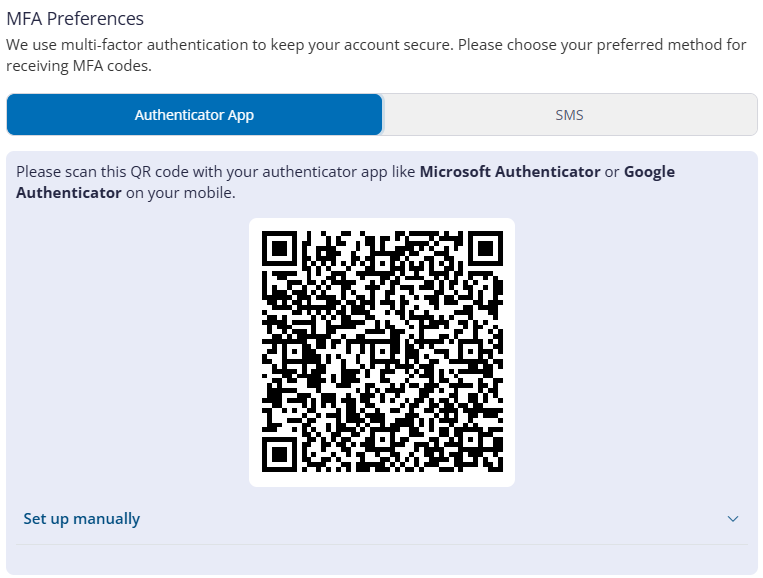
Authentication setup screen. Click to expand
What's new?
- Authentication app support: Set up multi-factor authentication using authenticator apps such as Microsoft Authenticator or Google Authenticator.
- User-controlled preferences: Switch between SMS and app-based authentication as required.
- Simple setup: Follow the step-by-step guide through the process of scanning a QR code or entering a secret key to connect your authentication app.
- Administrator controls: Administrators can configure MFA settings for users and reset MFA if a device is lost or stolen.
- Availability to everyone: App-based MFA is available for all Cintra People users: payroll staff, bureau users, and employees.
What are the key benefits?
Authentication apps offer significant security and usability improvements over SMS-based codes:
- Enhanced security: Authentication apps are more secure than SMS, protecting your account from SIM-swapping attacks and interception.
- No mobile signal required: Generate verification codes instantly, even while abroad or in remote locations.
- Faster sign-ins: Access codes immediately from your device without waiting for text messages to arrive.
- Complete control: Change your MFA method anytime, or ask your administrator to reset it if needed.
What next?
You can start using app-based authentication straight away. The setup wizard will appear automatically on your next sign-in if your administrator has enabled MFA for your account. You can also switch to app-based authentication anytime by accessing Authentication preferences from your user menu.
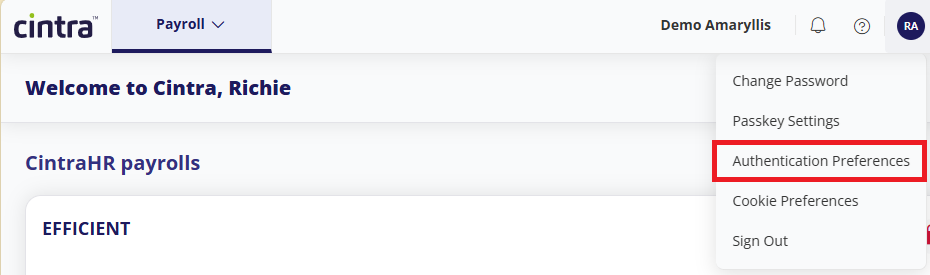
For more information, see Accessing and logging into Cintra People - Authentication preferences.

Cintra People Payroll's Pay Variance Report helps you spot pay changes faster
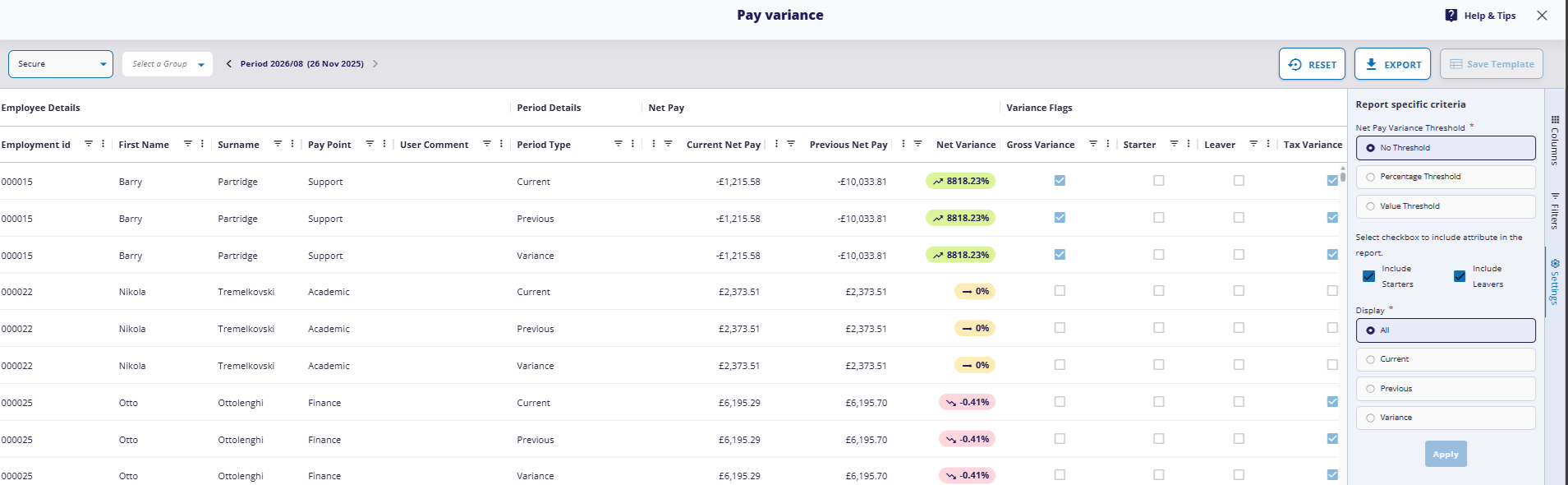
We are pleased to launch a new Pay variance report to Cintra People Payroll, giving you detailed visibility of pay changes across periods.
What's New?
- Period‑on‑period comparison: Review pay, deductions, and net pay across two payroll periods side by side.
- Variance indicators: Automatically highlights increases and decreases for every pay element.
- Employee‑level drilldown: Open any employee’s row to see exactly which values changed and by how much.
- Configurable columns: Choose which pay elements you want to include in the comparison.
- Downloadable output: Export the full variance table for audits, reviews, or internal approvals.
What are the key benefits?
The new report helps you identify unexpected pay changes quickly, reduces manual checking, and improves confidence in payroll accuracy before approval.
What next?
The Pay Variance Report is ready for you to try out! To access it, you can either:
- Open any payroll, click the Reports tab, then open the Pay Variance report.
- Open the Reports menu in the side menu, click the Pay Variances tile, open the Pay Variance report, then select which payroll to view.
To find out more, read the Pay variance report help article.
Was this article helpful?
That’s Great!
Thank you for your feedback
Sorry! We couldn't be helpful
Thank you for your feedback
Feedback sent
We appreciate your effort and will try to fix the article