The HMRC Checklist is used to collect key starter information for new employees, replacing the old P46 form. It ensures accurate tax code assignment and helps you stay compliant with HMRC requirements when adding new starters.
TABLE OF CONTENTS
Adding a new employee
When adding a new employee, you must record whether they have supplied an HMRC starter checklist:
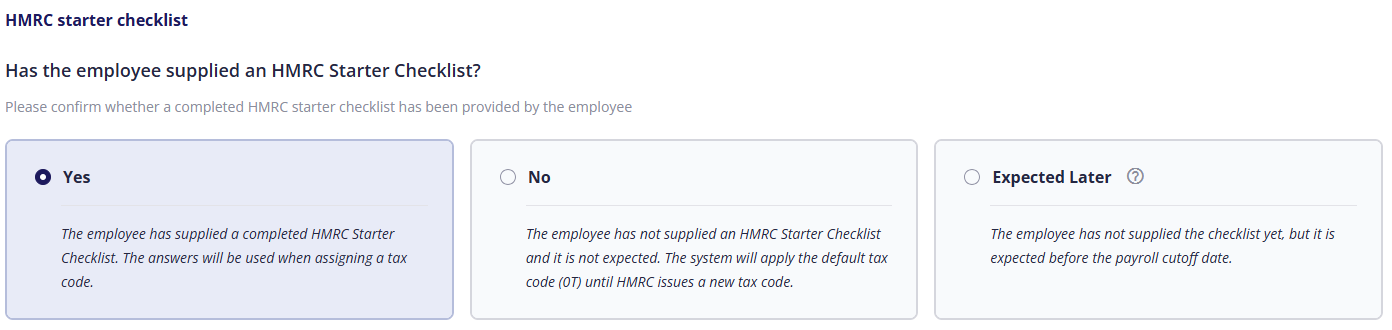
Yes: the employee has supplied the checklist

You must select one of the following options:
- Statement A: The employee should receive their full personal allowance for the year. Tax will be calculated on a cumulative basis, taking into account earnings and tax from earlier in the year.
- Statement B: Tax should be calculated as if this is the employee’s first pay period of the tax year. Previous earnings and tax are ignored.
- Statement C: The employee’s earnings in this job should be taxed at the basic rate. No personal allowance is applied, so tax is charged from the first pound they earn. For more information on tax codes, visit the HMRC website.
On the next page, you must select whether the employee has a student and/or postgraduate loan.
If the employee does have a loan AND repayments should begin through payroll, you must select the correct student loan plan, and whether the employee has a postgraduate loan.
No: the employee has NOT supplied the checklist and is not expected to
The default tax code 0T will be applied to the employee. For more information on tax codes, visit the HMRC website.
Expected Later: The employee is expected to supply the checklist before the next payroll cut-off date.
You should edit the employee before the payroll cut-off date, otherwise they will be assigned the 0T tax code.
Editing an employee
If you did not have the checklist when the employee was created, you can add it later by editing the employee. To do this, click the HMRC starter checklist tab, then click Add HMRC checklist, then Yes.
For more information on the different statements and other information required, see Adding an employee above.
Previous article | Next article Employee: Pensions membership |
Was this article helpful?
That’s Great!
Thank you for your feedback
Sorry! We couldn't be helpful
Thank you for your feedback
Feedback sent
We appreciate your effort and will try to fix the article