Costing details let you determine how the cost of paying an employee is to be allocated, usually against one or more departments.
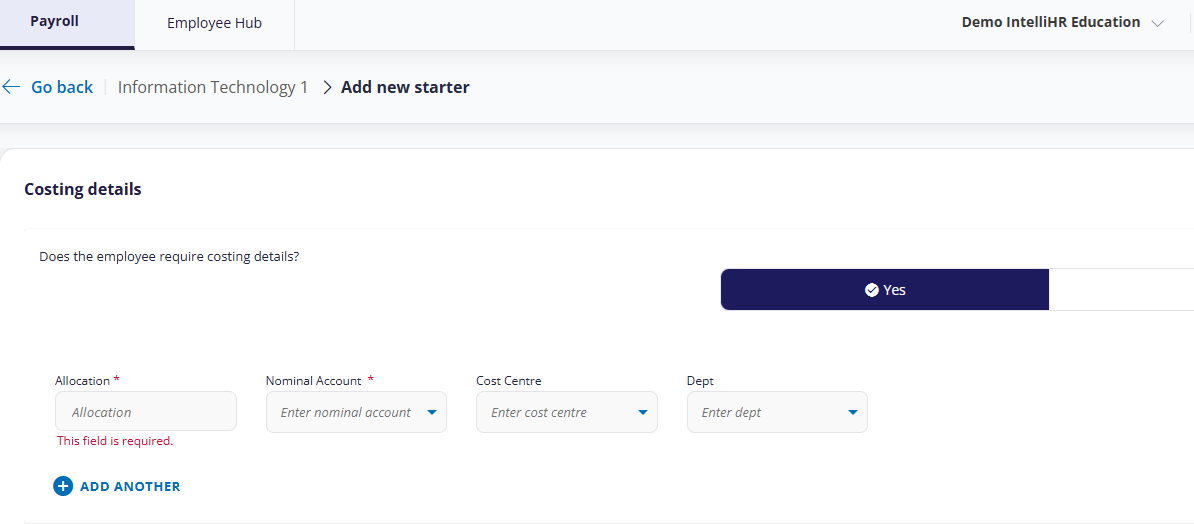
(click to expand the Costing Details screen)
Note: The costing details fields within your organisation may differ
To allocate costing information:
- On the Costing Details screen, click Yes.
- Allocation: Enter a % (maximum 100) to allocate to the account.
- Account: Accounts are maintained in Cintra iQ.
- Department / Cost Centre: These are maintained in Cintra iQ.
- Repeat these steps for each costing. The total allocation cannot exceed 100%.
Previous article | Next article Employee: Position details |
Was this article helpful?
That’s Great!
Thank you for your feedback
Sorry! We couldn't be helpful
Thank you for your feedback
Feedback sent
We appreciate your effort and will try to fix the article