Within your organisation, different employees may have different holiday entitlements, for example to reflect location or length of service. You can also apply exclusion sets to record which days are automatically non-working days for the employee.
TABLE OF CONTENTS
- Holiday entitlement fields
- Holiday entitlement when adding an employee
- Holiday entitlement when editing an employee
Holiday entitlement fields
When recording entitlement, you must enter:
- Exclusion days set: These are dates on which the employee is automatically not working, such as public holidays or during shutdown.
- Holiday type:
- Holiday scheme: This records how many days off the employee is entitled to
- Entitlement: The standard number of days available to the employee.
- Bank holiday adjustment: The number of days which are automatically removed from an employee's entitlement.
- Brought forward (editing only): Holidays carried over from previous periods.
- Adjustment: Any further holidays that should be added/removed from the employee's entitlement.
- Total entitlement = Entitlement + Bank holiday adjustments + Brought forward + Adjustment.
- Holiday approval manager: The employee you add will be notified whenever the employee requests a holiday.
- Subordinates (editing only): Any employees who have their holidays approved from this employee.
Holiday entitlement when adding an employee
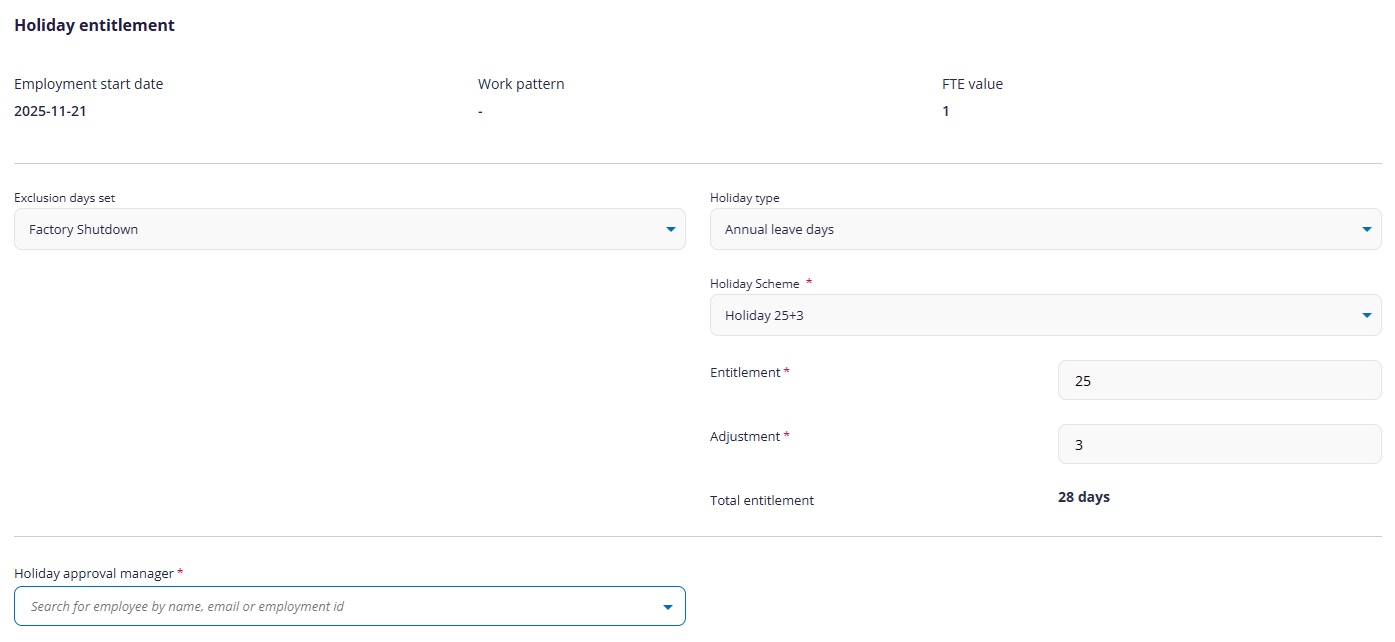
(click to expand Add Holiday Entitlement screen)
When adding a new employee, you can only set up their current holiday entitlement, which will start on the employment start date shown. If you want to add further holiday entitlements, you will need to edit the employee.
Holiday entitlement when editing an employee
When editing an employee, you can view all current and previous holiday entitlements, exclusion sets, holiday approver, and subordinates of the employee.
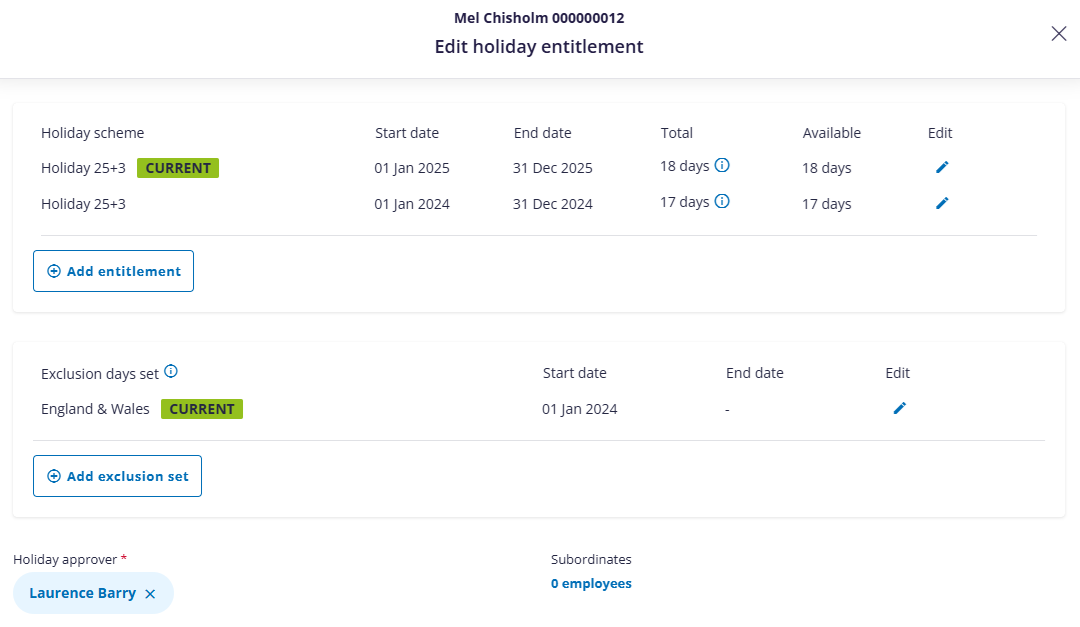
(click to expand edit Holiday Entitlement screen)
From here you can:
- Add new or edit existing holiday entitlements.
- Add new or edit existing exclusion sets.
- Set holiday approvers and subordinates.
Adding/editing holiday entitlements
When you click Add entitlement or edit an existing entitlement, you can enter the following information:
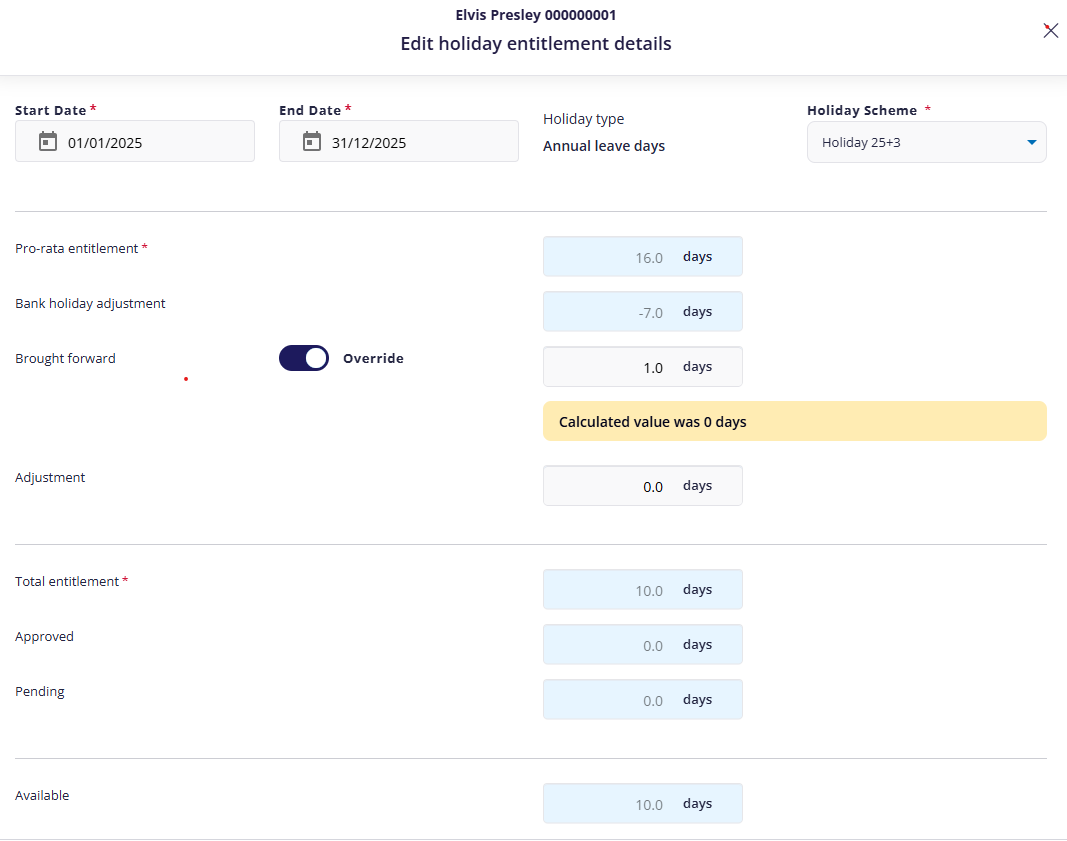
(click to expand holiday entitlement screen)
When adding a new holiday scheme, you must enter a start and end date, and choose a suitable scheme.
- No holiday scheme periods can coincide.
- You can adjust the employee's holidays by clicking override, then editing the number of holidays brought forward. You can also edit the overall adjustment.
- The total number of holidays the employee is entitled to, how many are approved / pending / still available, are all read-only.
- You can also delete the entitlement details.
Exclusion days set
You can assign multiple exclusion days sets to an employee. Unlike holiday schemes, you don't need to enter an end date if the exclusion set still applies.
Holiday approvers
Every employee should have another employee who approves any holiday requests.
- You must remove an existing approver before adding a new one.
- To assign a new employer, click Assign, then searching for the approver by their name/email/ID.
Changing subordinates
You can add/remove which employees must have their holidays approved by this employee. To do this, click the link beneath Subordinates. Here, you can:
- Assign a subordinate by typing a person's name/email/ID, then clicking Assign.
- Assign an existing subordinate to another employee by clicking the Re-assign icon
 , then searching for and assigning another employee.
 - Remove
 the employee's approver.
Was this article helpful?
That’s Great!
Thank you for your feedback
Sorry! We couldn't be helpful
Thank you for your feedback
Feedback sent
We appreciate your effort and will try to fix the article