TABLE OF CONTENTS
- Overview
- API credentials administrator role
- Managing integrations
- Cintra Public API documentation
- Integration permissions
Overview
This new feature lets you set up an API connection between Cintra People Payroll and your external systems, including creating API credentials and self-managing credential rotation when needed.
- Create API Credentials (Client ID + Client Secret)
- Download integration instructions (how to authenticate + call the API)
- Create an integration (links credentials to your organisation and set permissions)
To do this, you will need to be assigned the API credentials administrator role.
API credentials administrator role
Users with this role can:
- Configure and manage API integrations within your organisation.
- Access technical settings in Cintra People.
Users with only this role cannot:
- Manager users and roles
Initially, Cintra Support will assign this new role to administrators. After this, only users with the roles of API credentials administrator AND user administrator will be able to assign it to other users.
Managing integrations
Setting up a new integration
- Go to API Credentials → Create API Credentials.
- Copy/save the Client Secret (this will only be shown once).
- Go to Integrations → Create Integration.
- Select the API Credentials to use.
- Assign the required permissions.
- Download the Instructions and follow them to generate a token + call the API.
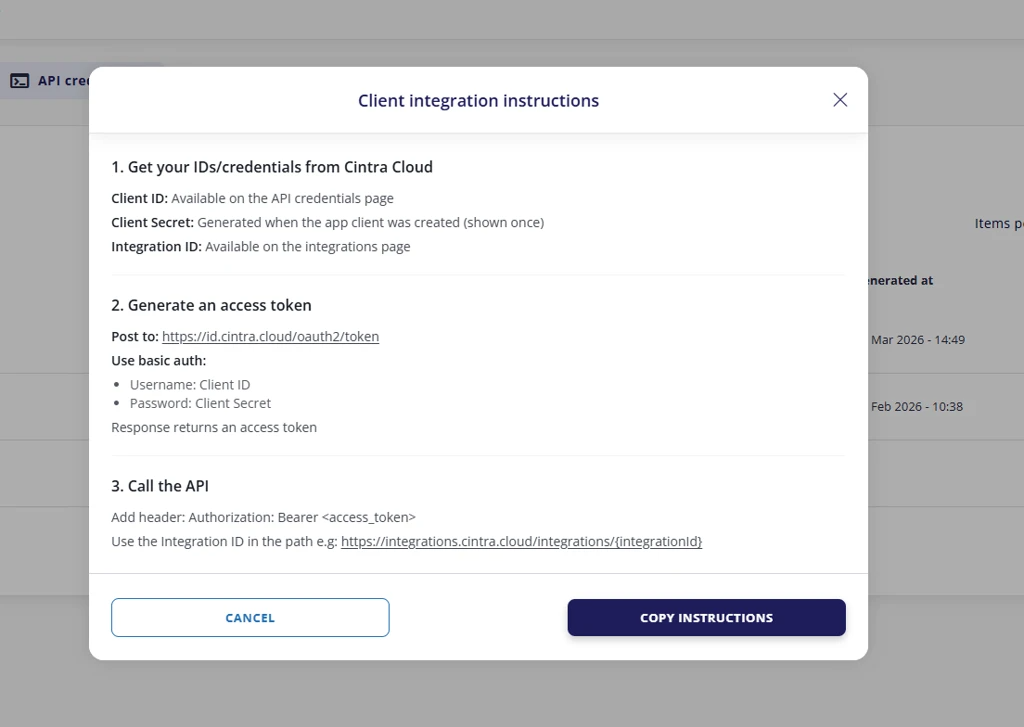
You can obtain this information from the following places:
- Client ID: From the API Credentials page
- Client Secret: This is shown once when creating new API Credentials, therefore you should save it securely.
- Integration ID: From the Integrations page
Rotating credentials (create new without breaking access)
To replace credentials (for example, if an administrator leaves your organisation);
- Create the new API Credentials.
- Create a new Integration using the new credentials (set permissions).
- Update your external system to use the new Client ID/Secret + Integration ID.
- Once confirmed working, delete the old Integration.
- Delete the old API Credentials.
Cintra Public API documentation
For more information on our APIs, see Cintra Public API Docs
Integration permissions
| Permission | What it allows | Typical use case |
|---|---|---|
| GET_REFERENCE_DATA | Read lookup/config data used for mapping and validation (e.g., payrolls, payment headings, payroll periods, employers, nationalities, work patterns). | Needed by most integrations to map values correctly and validate payloads. |
GENERAL_PURPOSE_READ | Read broad payroll operational data (e.g., employments, payments, payment runs, organisational structures, reporting lines, positions). | When the integration needs to pull payroll data. |
| GENERAL_PURPOSE_WRITE | Create/update payroll operational data (e.g., create/update employments, create/update payments including one-off payments where supported, update certain structures/operations). | When the integration needs to push changes into Cintra (HR/payroll automation). |
| ADD_PERSON | Create a new person (employee) record. | Onboarding new starters into Cintra. |
| GET_PERSON | Read person (employee) records and related details. | Identity matching, verifying records. |
| UPDATE_PERSON | Update existing person records (e.g., name, address, contact details). | Changes to employee details. |
| ADD_DOCUMENT | Upload documents to employee records. | Integrations that need to store contracts/ID/certificates in Cintra. |
| GET_DOCUMENT | Download/retrieve documents attached to employee records. | Integrations that need to fetch previously uploaded documents. |
| ADD_DBS | Create DBS (background check) records. | Organisations tracking DBS checks in Cintra. |
| GET_DBS | Read DBS records. | Viewing DBS information stored in Cintra. |
| ADD_SELF_SERVICE_USER | Create employee self-service portal accounts. | Auto-provisioning employee portal access. |
Was this article helpful?
That’s Great!
Thank you for your feedback
Sorry! We couldn't be helpful
Thank you for your feedback
Feedback sent
We appreciate your effort and will try to fix the article